The case against the AI feature
Bolting a model onto a finished product isn’t a strategy. What AI-native actually demands of a roadmap.
Contents6 sections
A surprising amount of AI product work begins with the wrong question:
Where can we add AI?
The result is usually familiar. A chat box appears beside an existing workflow. A summarise button is added to a page. A model is asked to generate copy that users were already writing themselves. The interface changes, but the product logic underneath it stays almost exactly the same.
That can still be useful. But it is not what makes a product AI-native.
The more important question is:
What would this workflow look like if intelligence were available at every step from the beginning?
That question produces a very different roadmap.
Features preserve the old workflow
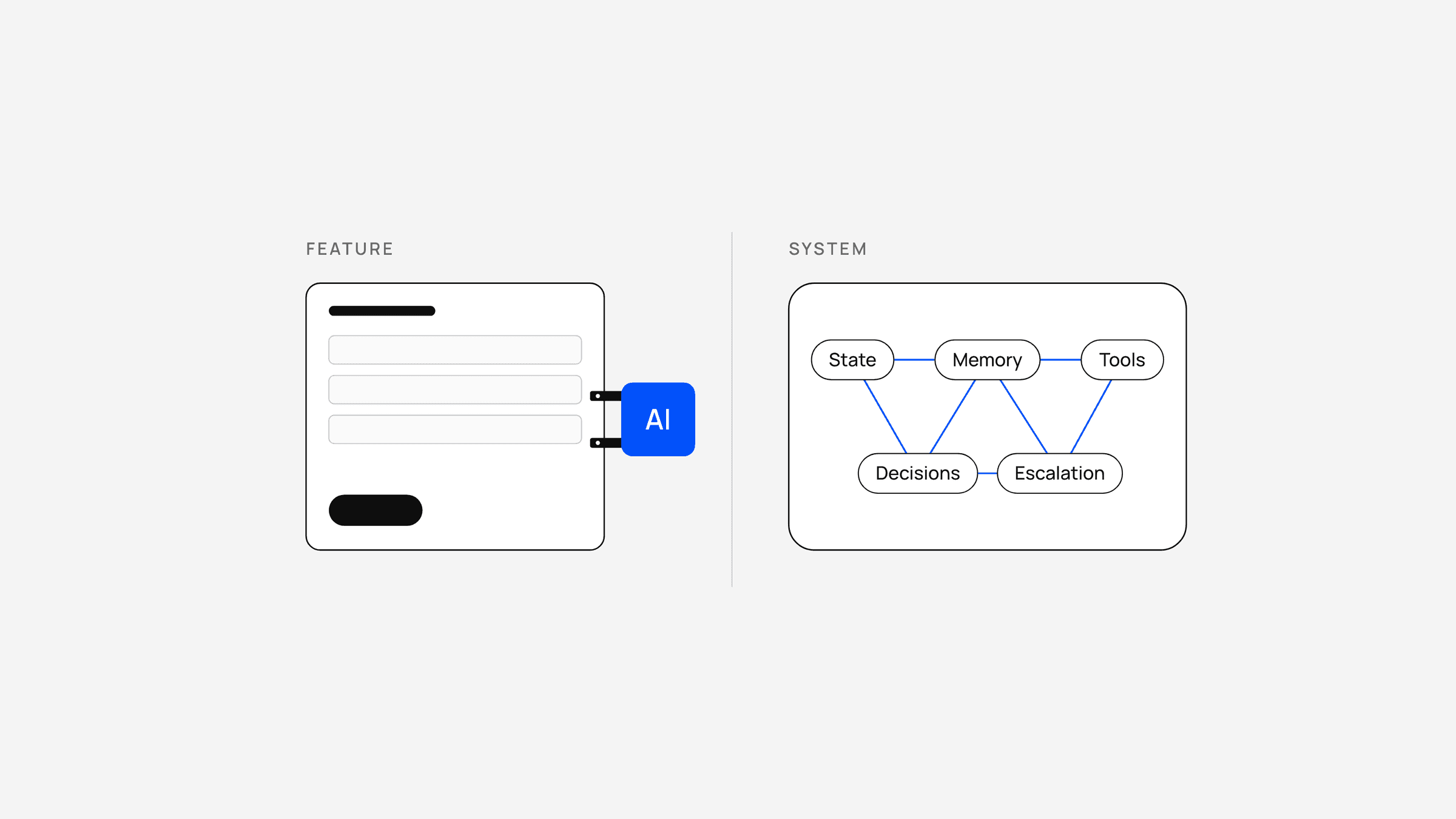
A conventional feature sits inside an existing product model.
There is already a sequence of screens, forms, permissions, records and user actions. The AI capability is inserted somewhere inside that sequence.
This usually creates local efficiency.
A salesperson can generate an email faster. A support agent can summarise a ticket. A finance user can ask a question about a report. A customer can search documentation conversationally.
All of these can be valuable.
But the underlying workflow still assumes the person is doing the work and the software is helping.
An AI-native product starts by questioning that assumption.
If a system can interpret an inbound lead, identify missing information, decide which questions matter, update the CRM, propose a next action, schedule a follow-up and escalate when necessary, then the product should not be designed as a collection of screens that require a salesperson to manually perform each step.
The unit of design has changed.
The product is no longer only an interface for work. It is part of the workforce.
Traditional
- User
- Screen
- Form
- User action
- Next screen
- AI helper
AI-native
- Intent
- Run by the systemStateAgent actionToolDecision
- Exception / approval
- Outcome
- A person does it
- The system does it
- AI added alongside
- Outcome
Start with the workflow, not the model
Teams often spend too much time choosing models before deciding what responsibility the system should actually hold.
Model selection matters. But it comes later.
The first design problem is operational:
- What outcome is the user trying to achieve?
- What decisions are made along the way?
- What information is required?
- Which actions can be automated safely?
- Which actions need approval?
- What state needs to persist between steps?
- What should happen when the system is uncertain?
- Where does a person need to enter the loop?
Once those questions are answered, the role of the model becomes clearer.
Sometimes the system needs generation. Sometimes classification. Sometimes retrieval. Sometimes tool use. Sometimes there is no reason to use a model at all.
The data model changes too
One of the clearest signs that an AI feature has been bolted on is that the underlying data model remains untouched.
A chat assistant is connected to a product, but the important business state still lives elsewhere.
The conversation does not update the customer record. The voice agent does not share state with the CRM. A generated recommendation is not tied to a decision, commitment or future action. The model appears intelligent in the moment, but the system forgets what happened as soon as the interaction ends.
That is not primarily an interface problem.
It is an architecture problem.
AI-native products require persistent state.
The system needs to know what has happened, what has been promised, what is still pending, what evidence supports a decision and what should happen next.
This is why the data layer often matters more than the visible AI interaction.
A convincing demo can be built around a model. A reliable product has to be built around state.
- Conversation
- Voice
- Web
- CRM
- Workflow
Shared stateWhat has happened, what has been promised, what is still pending
- Next action
- Commitment
- Follow-up
- Escalation
The interface becomes thinner
When intelligence moves deeper into the workflow, the interface often becomes simpler.
Users do not need a screen for every intermediate action if the system can complete those actions itself.
Instead, the interface shifts toward:
- intent;
- status;
- exceptions;
- approvals;
- evidence;
- outcomes.
This is a different design problem from adding an assistant beside an existing dashboard.
The challenge is not showing everything the system can do. It is showing the right amount of control over a system that is already doing work.
That is why some AI-native products look surprisingly quiet.
The complexity has not disappeared. It has moved beneath the interface.
Roadmaps should change
The same logic should affect product planning.
A traditional roadmap often treats AI as one workstream among many:
- Q1: redesign dashboard
- Q2: add AI assistant
- Q3: improve reporting
- Q4: automate onboarding
An AI-native roadmap asks whether those should even remain separate initiatives.
If intelligence can participate in onboarding, reporting, support and workflow management, then the architecture should be designed around shared capabilities: identity, memory, permissions, tool access, orchestration, evaluation and human escalation.
That foundation is less visible than a new feature, but it compounds.
Each new capability becomes easier to build because the system already knows how to act.
The feature is sometimes still the right answer
There is nothing wrong with a narrow AI feature when the problem is narrow.
A summariser can be useful. A writing assistant can be useful. Search can be useful.
The mistake is calling that transformation.
AI-native product design is not about forcing an agent into every workflow. It is about being willing to redesign the workflow when intelligence changes what is possible.
The strongest products will not be the ones with the most AI features.
They will be the ones where the distinction between “the product” and “the AI” eventually stops being useful.